CS Battlefield Dance Giveaway
Giveaway
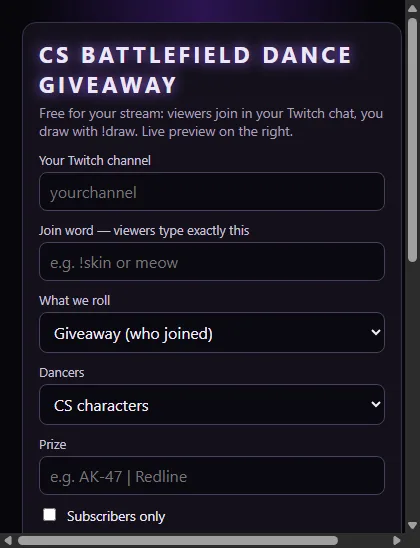
Free CS Battlefield Dance Giveaway for Twitch: viewers join in chat with your join word and a mod draws the winner on stream with !draw. Add it as a Browser Source in any streaming app, no Streamer.bot.
How it works
From this page to your stream
- Type your Twitch channel name and pick your look.
- Click Copy browser link.
- Add a Browser Source in your streaming app (OBS, Streamlabs, Meld …) and paste the link, done. Your chat is read anonymously, the tool never writes in it.
- Reuse it every stream: click Copy dock link and add it in OBS Studio under Docks → Custom Browser Docks. From the dock you open and close entries, draw the winner, reset and switch the style, without a new link.
- Use the Download version below (ZIP) – the browser link from this page only works in OBS.
- Browser Source: add a Browser Source in your app (Streamlabs: Sources → + → Browser Source) and paste the BROWSER SOURCE link.
- Dock: paste the DOCK link into Chrome or Edge and keep that tab open while you are live – that tab is your dock.
- They talk through the C4TM30W relay: internet needed, nothing is saved. Downloaded before 3 Nov 2026? Download again.
 0
Set it up here
Make your browser link
Change the settings, watch the live preview, then copy your link. Nothing to download or install.
Download version
Browser Source + Dock as files
Prefer it on your PC? The download has a Browser Source and a Dock for OBS: change everything in the dock and press Send to stream, your settings stay after restarting OBS. Free, nothing to install.
What is a dock? A small window inside OBS next to your scenes. You click buttons there instead of typing chat commands or making new links. Both files are in the same ZIP.
Requirements
- Any streaming app with a Browser Source (OBS, Streamlabs, Meld …)
- Your Twitch channel name, no login
- No Streamer.bot, no install
Free to use
© C4TM30W. Free to use on your own stream through this page. Copying, re-hosting or distributing the tool or its code without written permission is forbidden.